
NuAngel.net - a tech blog founded by Garrett -NuAngel- Culver. This website is dedicated to provide technical assistance, free technical support, technology headlines, news, and information on other interests of NuAngel's! NuAngel provides informative articles supporting Windows 8, and all prior versions of Microsoft Windows. Music, movies, video games, breaking news. Unique editorials you won't find anywhere else. The latest news in gaming, and reminiscing about classic and vintage video games. Atari 2600, Nintendo, Top Loader Nintendo, NES-101, Super Nintendo, Nintendo 64, Wii U, Sony Playstation 4, Microsoft Xbox 360, Ouya, GameStick, preorder game consoles. NuAngel has been under this name since 1999, NuAngel first created the NuDrivers for 3dfx Voodoo 5500 cards, and has been active in gaming and technology communities via the internet for a LONG time.

Solution to The Trust Relationship Between This Workstation and Primary Domain Failed

March 6th, 2012 by NuAngel Leave a reply »

Happy Tech Tip Tuesday to you! In this week’s edition, I bring you a technical and ugly problem. When you try to log on to your computer, you receive the error message: “The Trust Relationship Between This Workstation and Primary Domain Failed.” Get your IT guy, because this one is going to require a little bit of tech savvy and a few passwords that not everybody in an organization is going to have. We won’t get in to the nitty gritty of why this happens, we’ll just get right down to how to fix it!


The first thing we need to when we get the error “The Trust Relationship Between This Workstation and Primary Domain Failed” is to get logged back in to the machine. Preferably with the domain administrator’s credentials. Typically, in a simple network setup, the user’s name is Administrator and it’s the password used to log on to the domain controller, or your primary server.


Don’t miss this step: What if that user still can’t get logged in? Simple! UNPLUG THE NETWORK CABLE from the computer. When it cannot detect a network connection, the computer will allow you to login with cached credentials, meaning it will accept the name and password that it remembers from the last time you logged on.


Once you’re logged on as Administrator, you need to place the computer in to a workgroup, then RE-Join it to the domain. Here’s the blow by blow:

  1. On the keyboard Hold down the Windows Key and Press the Pause Key
  2. (or RIGHT CLICK the “Computer” or “My Computer” in your Start Menu and click “Properties”).
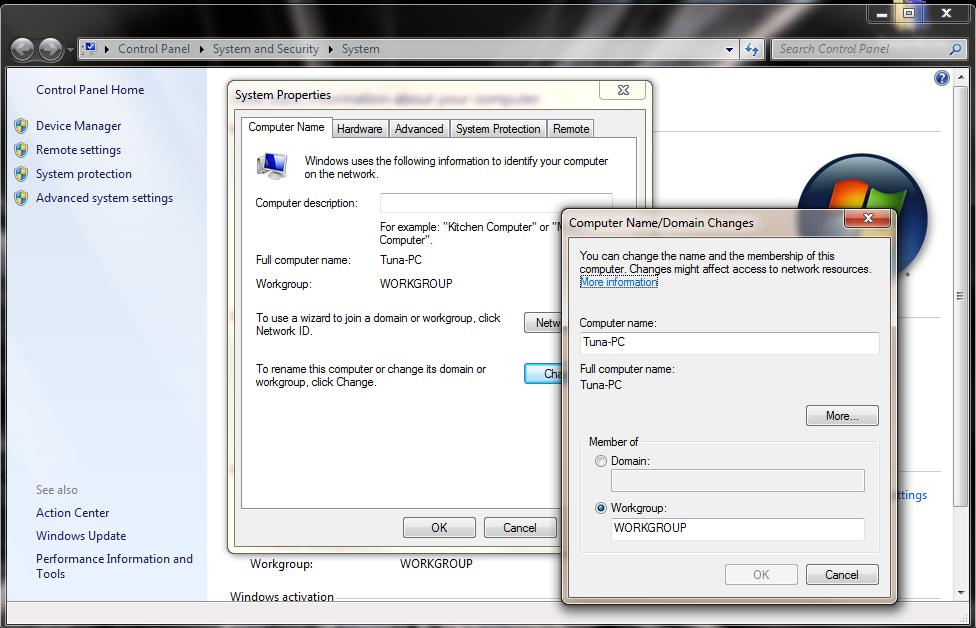
  3. In Windows XP, click the Computer Name tab – in Windows Vista/7, click Advanced System Settings on the left, then click the Computer Name tab.
  4. Click the Change button
  5. At the BOTTOM of the Window, first NOTE WHAT IT SAYS IN THE DOMAIN FIELD. WRITE THIS DOWN.
  6. Select the WORKGROUP radio button & enter a name (example: call it WORKGROUP temporarily)
  7. Click OK. You MAY be prompted to restart the computer. Decline at this time.
  8. If necessary, plug your network cable back in at this time.
  9. Click the CHANGE button again.
  10. Click the Domain radio button and enter the information you wrote from step 4
  11. Click OK and restart the computer as asked.

Upon rebooting, you should be able to log back in to the computer as yourself! If you restarted during step 6, you will need to login using a username with Local Administrator Credentials. If you don’t know a password or username to use, you’ll have to reset them using a tool called NTPassword (looks fake, works great) (UPDATE: New Blog Post: how to use NTPassword), but I won’t get in to the specifics of that here. On some Windows XP machines, you may get lucky just trying the name Administrator with no password. Best of luck in the process, though. It generally isn’t too painful to get back online after “the trust relationship has been broken!”

Advertisement
8 comments
TopIT
TopIT

Another is just to login to the server , choose active directory users and computers', right the computer that is locked and click enable account, you'll see a down arrow been removed .

M Adeupname
M Adeupname

 Didn't work, I was unable to rejoin the original domain, receiving error message "The join operation was not successful. This could be because an existing computer account having name "NAME" was previously created using a different set of credentials. Use a different computer name or contact your administrator to remove any stale conflicting account. The error was: Access is denied." Using a different computer name didn't help. I used a Restore Point to regain access to the original domain, with the trust relationship problem remaining.

NuAngel
NuAngel

You mention using a restorepoint to connect to the "original" domain.  It sounds like you might be in the midst of a domain migration, and either something in the dcpromo process or something in moving of a computer to a new domain didn't go quite right.  Either way, I have confirmed many times over that these steps will work when a computer suddenly loses the trust relationship on a normal domain, but unfortunately, your situation sounds a bit more involved than the normal issues seen by most users.

NuAngel
NuAngel

Unfortunately, in that case, it sounds like there is a problem developing with the domain controller, or that computer's DNS configuration.

Sahid_ali
Sahid_ali

It is really simple than other solution, it worked Great, Thanks 

Mozelius
Mozelius

 I agree with every word in Michael's comment.  Thank you from me too!!

NuAngel
NuAngel

Thanks for the kind words. Here's hoping it will work its way up the page rank! :)

Michael
Michael

Thank you!!!  This was so simple compared to the other stuff I found.  I could not even log onto the computer let alone the domain.  Your easy to follow instructions worked like a charm!  This should be the top Google link when searching on "The Trust Relationship Between This Workstation and Primary Domain Failed"  Thanks again!!

Trackbacks

  1. MyVan says:

    MyVan…

    [...]Solution to The Trust Relationship Between This Workstation and Primary Domain Failed » NuAngel.net[...]…

__________

Advertisements

__________

NuAngel on Xbox Live
Xbox Live: NuAngel
PlayStation Network: NuAngel
Nintendo Network: NuAngel
Steam: NuAngel
Ouya: NuAngel

__________