

It’s Sunday. If I were doing my blogging as I should’ve been, then you would already know it’s time for the Xbox Tip of the Week! Too bad I haven’t been. Still, with the holidays recently passed, whether your received a new console as a gift, or (like me) you couldn’t resist a Black Friday deal, you may need to do some migrating of data. So why not learn how easy it is to use a Data Transfer Kit.
Just a year or two ago, these kits had to be ordered directly from Microsoft, and included a special disc to be inserted to your new console to begin the data transfer. Black Market vendors promised a good deal on eBay, but they never sent you a genuine data transfer cable or the correct disc. But now? It’s simple! The cable can be picked up in any major retail store and the software is built right in to the dashboard.
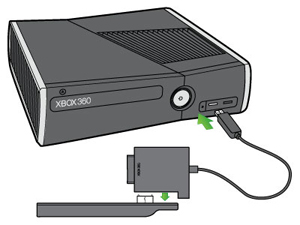
The steps are very straight forward, and a complete guide from Microsoft is available on Xbox.com, but it’s as simple as removing the old drive from the old console, snapping it to the data transfer cable, then plugging it in to the USB port on the new console. Then, when you power on the new console, you will be prompted on which direction you wish to transfer the data: select “Yes, Transfer TO CONSOLE” and the process begins. It is essentially “cut and paste.” If everything succeeds, the old drive will be wiped back to what is essentially a factory default state.
Good luck, and enjoy the fresh new console!